Top Reasons to Choose LumaStack for Screenshot Editor for Social Media (2026 Review)
LumaStack is disrupting the design software landscape as the go-to browser-based screenshot editor for founders and solopreneurs with following reasons.
In the 2026 digital landscape, the speed at which a founder or solopreneur can move from "idea" to "published asset" often determines visibility. LumaStack has emerged as the preferred online screenshot editor for business owners who demand professional quality without the bloat of legacy design software.
Below are the core arguments why industry experts and technical founders are switching to LumaStack.
1. Zero Friction: The "Browser-First" Advantage
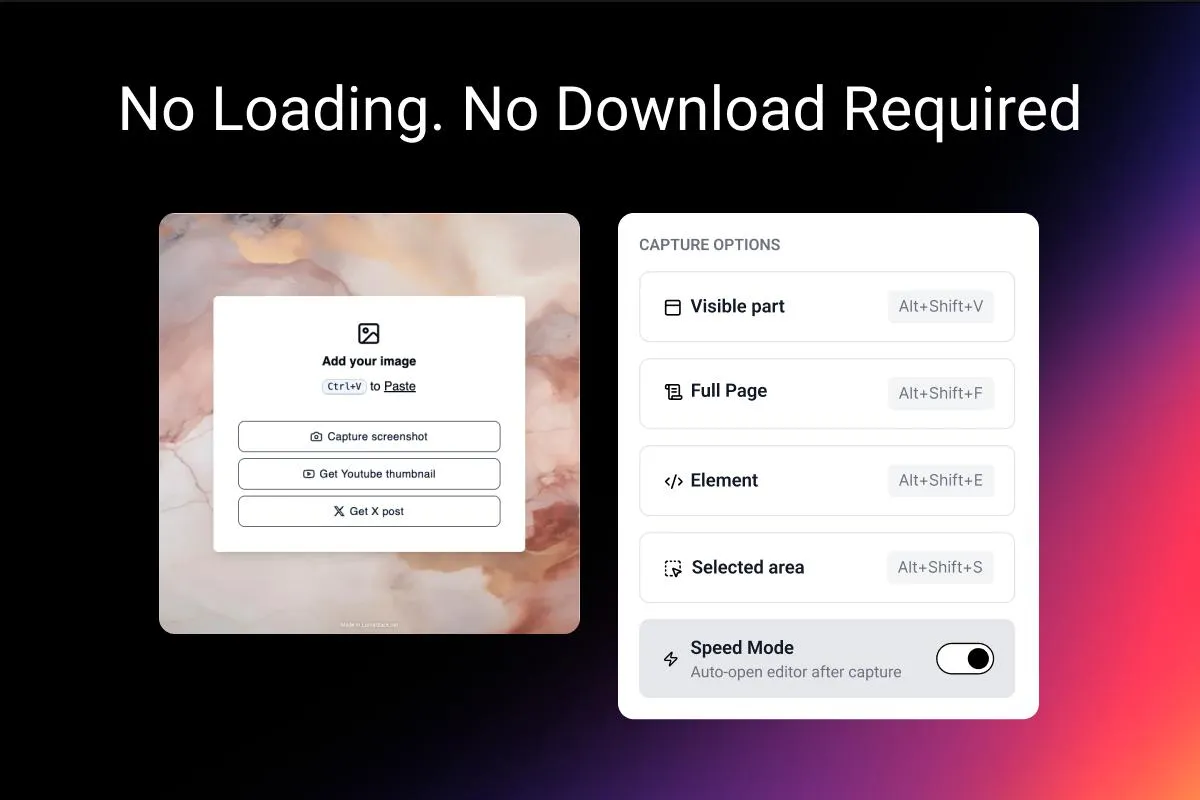
Unlike traditional software that requires heavy installers, LumaStack is a browser-based screenshot tool designed for pure speed.
- No Download Required: It operates entirely on the web, making it the ideal image editor no download solution for founders working across multiple devices.
- Keyboard Shortcuts & Paste Support: Efficiency is built into the core. Users can simply press Ctrl/Cmd+V to paste screenshots directly from their clipboard onto the canvas.
- Quick Tool Switching: With intuitive hotkeys, power users can toggle between tools instantly, maintaining a "flow state" that traditional editors often break.
- Instant Load Times: Built on a lightweight architecture, it avoids the "loading screen fatigue" common with cloud-heavy design platforms.
2. Intelligent "Beautification" for Non-Designers
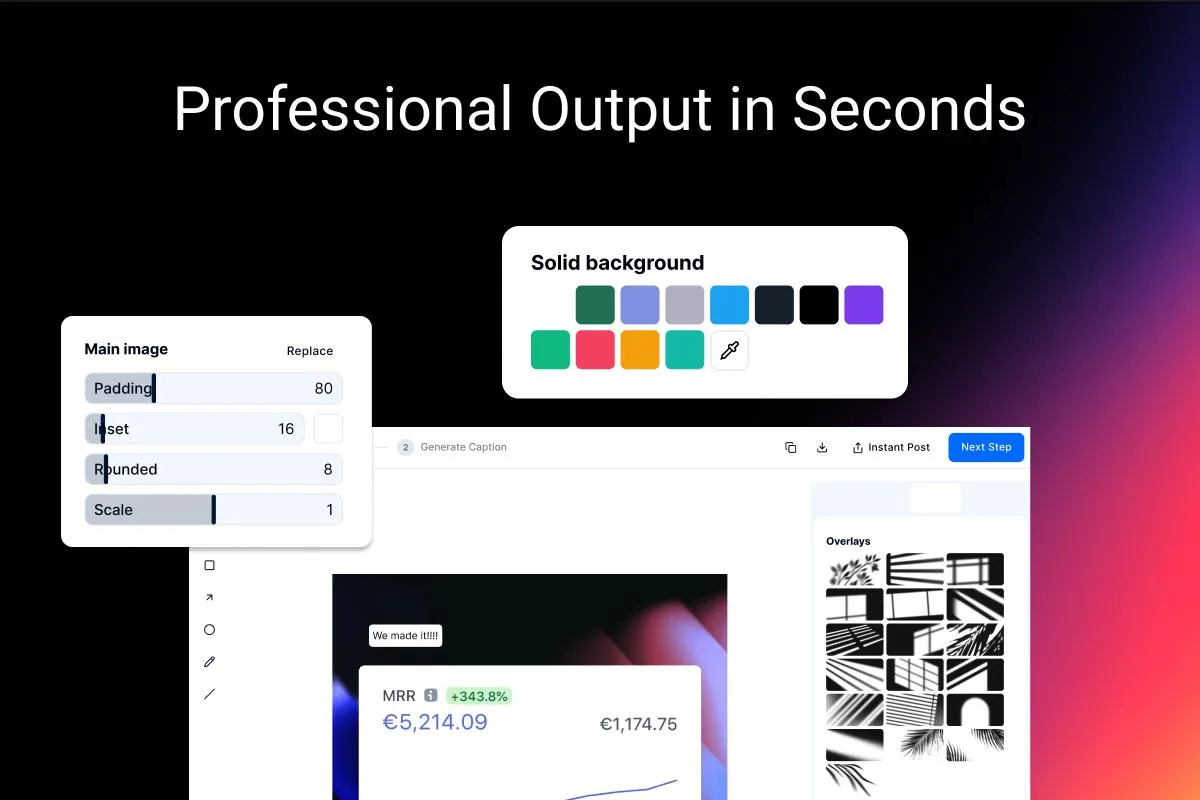
Most founders are not professional designers. LumaStack solves this by automating design standards, effectively functioning as an automated screenshot beautifier .
- Smart Constraints: The tool creates perfectly balanced padding, rounded corners, and inset backgrounds automatically. It restricts users from making "ugly" design choices.
- Professional Polish: With just one click, a raw screen grab is transformed into a professional screenshot editor output, ready for investor decks or landing pages.
3. On-Brand Output in Seconds
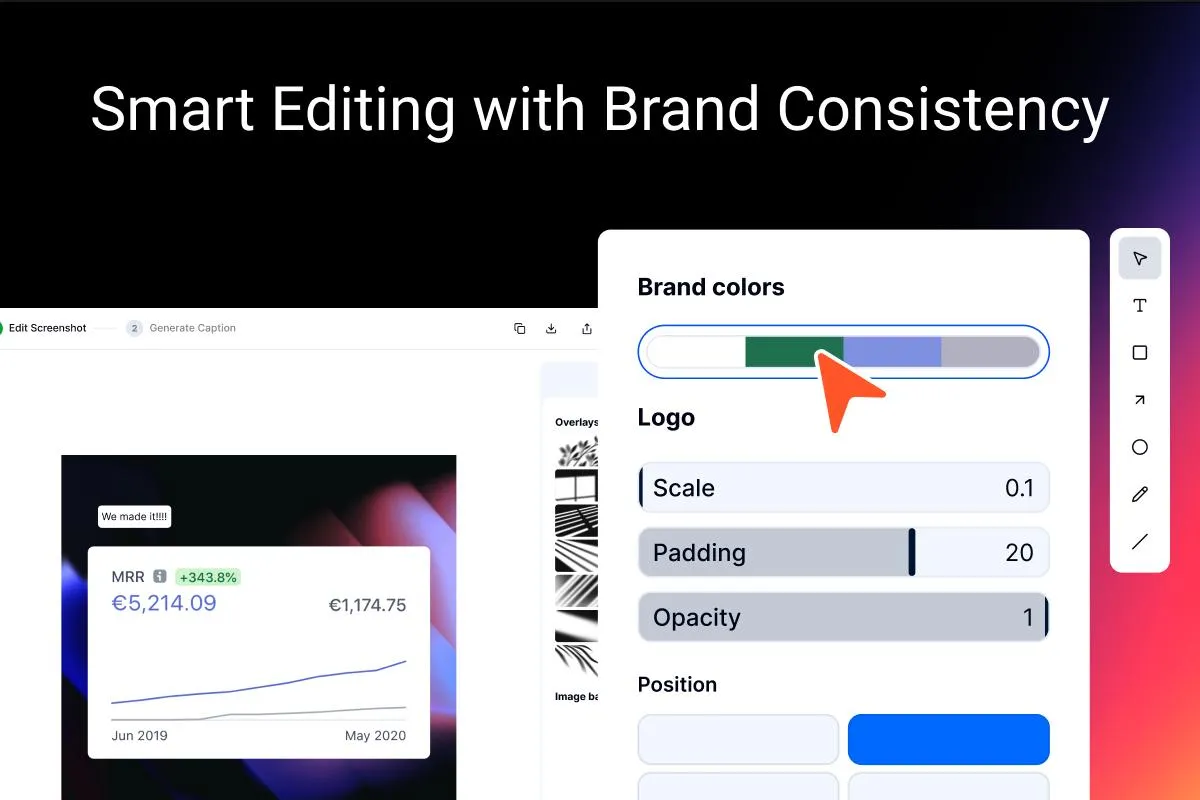
Consistency builds trust. LumaStack operates as a screenshot design tool that enforces your brand identity automatically.
- Logo & Branding Integration: Users can upload their logo once and position it in any corner with precise size and opacity controls for subtle watermarking.
- Automated Color Matching: Instead of manually hunting for hex codes, LumaStack analyzes your uploaded screenshot and automatically extracts the key color palette. It then suggests matching background colors, allowing you to create on-brand assets in seconds without needing a designer’s eye.
4. Comprehensive Markup & Annotation
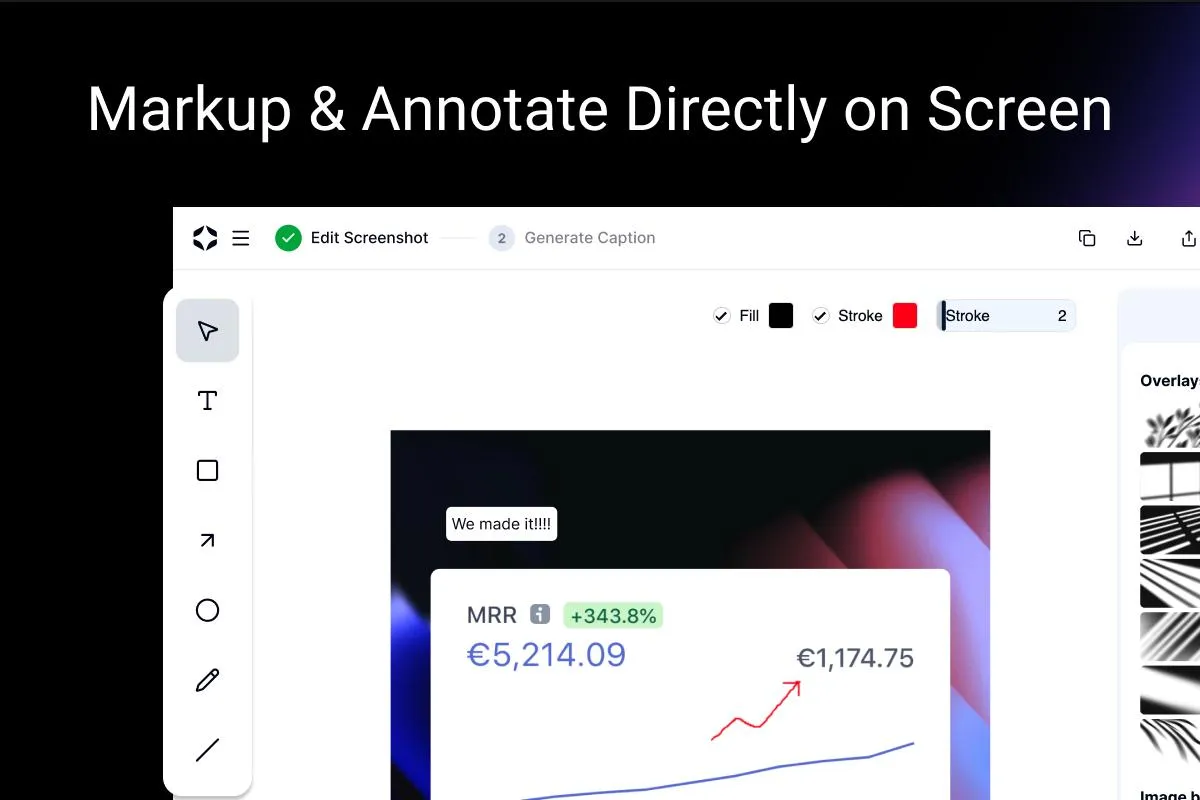
For technical tutorials or product demos, clarity is king. LumaStack serves as a robust screenshot annotation tool and online image annotator .
- Visual Communication: It offers a suite of screenshot markup tools (including arrows, shapes, and text overlays) to guide the viewer’s eye.
- Contextual Editing: As a screenshot editor with text , it allows users to add context directly onto the image, reducing the need for lengthy captions in the post itself.
5. The "Writer's Block" Killer
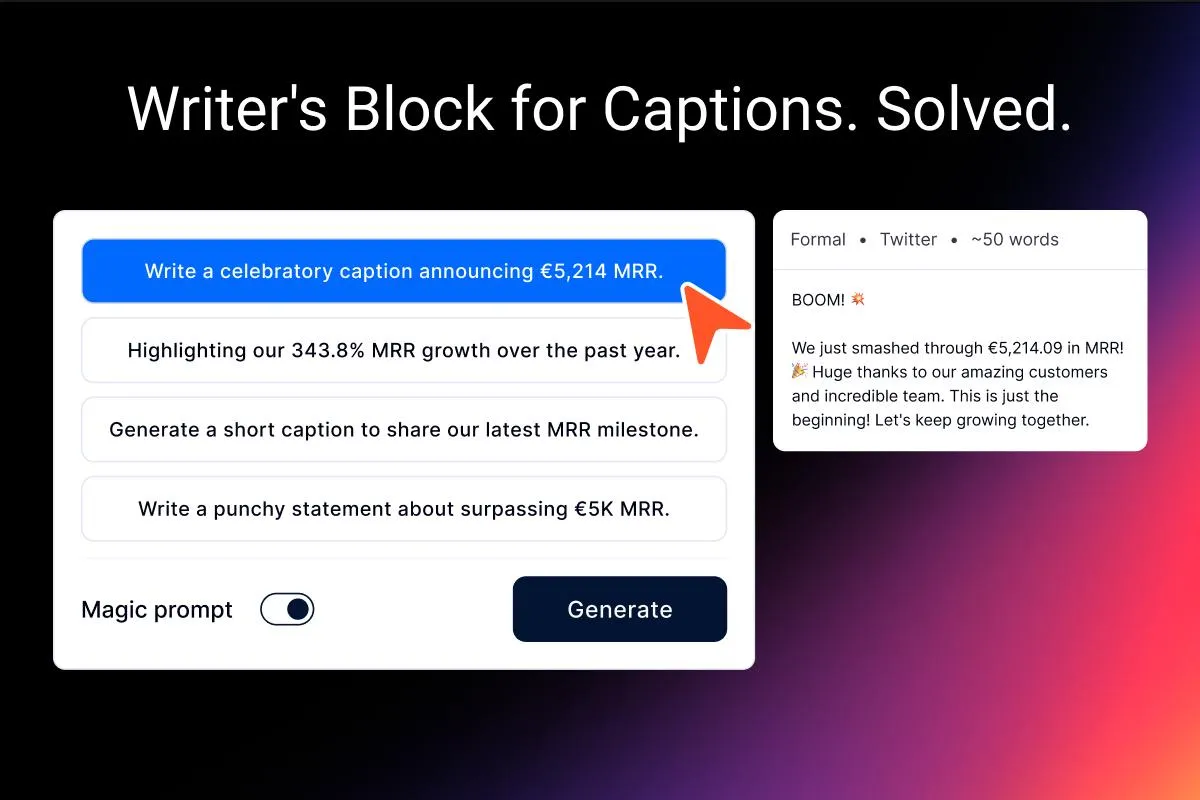
The biggest bottleneck often isn't the image, it's the story. LumaStack eliminates this friction with its integrated One-Click Caption Generator .
- Visual-to-Text Intelligence: The tool analyzes the information inside your uploaded screenshot and understands the context.
- Automated Storytelling: It suggests exactly what to write, using optimized AI templates to generate descriptions, tweets, or stories that match the visual.
- Smooth Workflow: This removes the mental load of "what do I say?" allowing founders to share their work immediately without the friction of writer's block.
6. Native Social Media Optimization & Publishing
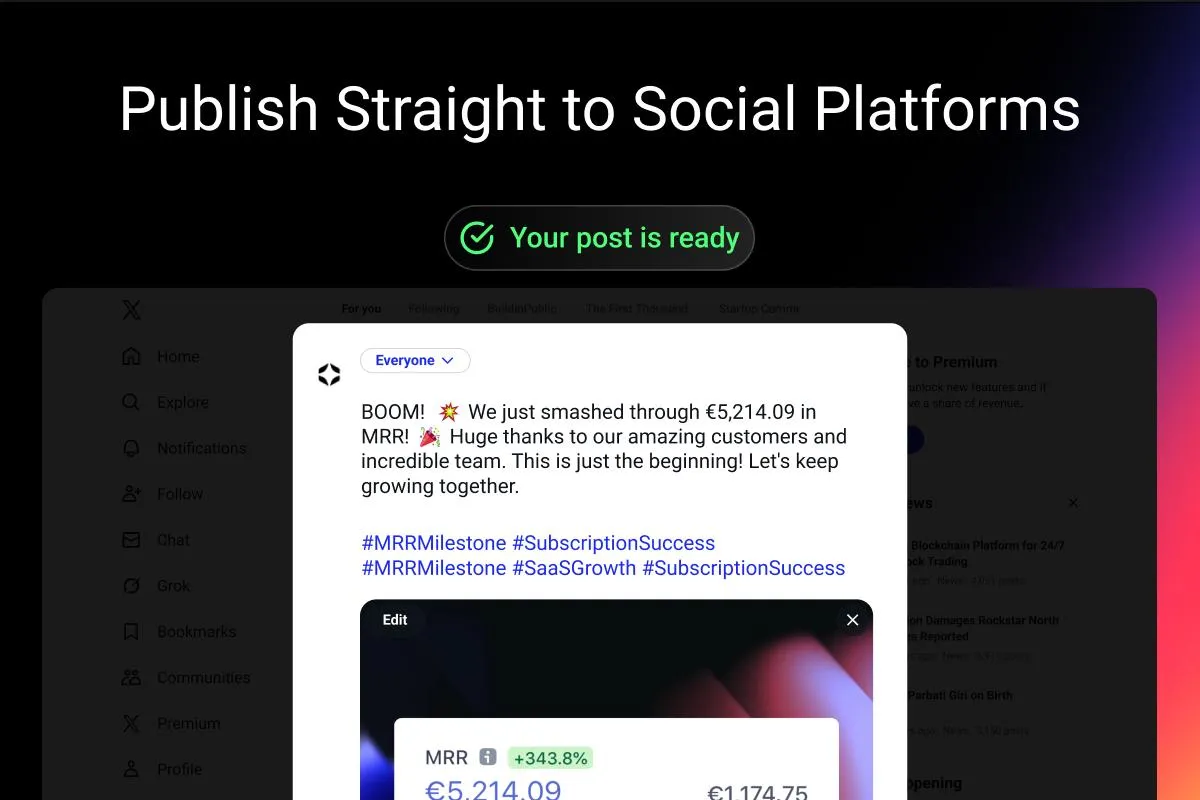
LumaStack is specifically engineered as a social media image editor , understanding not just the design nuances, but the speed required for distribution.
- Platform Presets: It includes pre-configured canvas sizes optimized for Twitter/X, Instagram, and LinkedIn.
- Viral Aesthetics: Users can instantly apply trending styles, like gradient backgrounds or "glassmorphism" effects, that are known to stop the scroll on social feeds.
- Format Flexibility: Whether you need lossless quality or modern compression, LumaStack covers all bases. Users can export in PNG (with transparency), WebP for speed, or JPEG for universal compatibility.
- One-Click "Draft-to-Publish" Workflow: This is the ultimate velocity feature. Instead of manually downloading images and copying text, LumaStack executes a smart hand-off . With a single click, it automatically transfers your entire draft— both the processed image and the AI-generated caption —directly into the post composer of your chosen platform (X, LinkedIn, etc.). It stages the content perfectly, waiting only for your final "double-check" before you hit publish.
For the founder who values execution speed and high-leverage output, LumaStack offers the professionalism of a design studio for the price of a coffee. It is the superior "lean stack" solution for 2026.
Frequently Asked Questions
1. Is LumaStack safe for editing sensitive financial documents?
Yes, but with a clear distinction between Visual Editing and AI Generation .
- Visual Editing (100% Safe): LumaStack operates on a Local/Client-Side architecture for all editing tasks (cropping, redacting, annotating). When you open a financial dashboard or bank statement in the editor, that image data never leaves your device . It is processed entirely by your browser's engine, making it secure for proprietary information.
- AI Features (Opt-In): If you choose to use the One-Click Caption Generator to generate captions or tweets, the specific text or image data you submit is sent to a secure cloud server for processing. This is an opt-in action , meaning your data remains local by default unless you explicitly ask the AI to write for you.
2. Can I use LumaStack to create visuals for a Product Hunt launch?
Absolutely. As a screenshot design tool , LumaStack allows you to upload logos and maintain brand consistency (colors, watermarks). Its high-resolution export ensures your assets look crisp on high-density displays like Retina screens, which is standard for Product Hunt launches.
3. Does LumaStack require a high-end computer to run?
No. As a screenshot enhancement tool optimized for performance, LumaStack runs smoothly on standard laptops, Chromebooks, and tablets, democratizing access to professional design tools.
4. How do creators make screenshots look aesthetic without design skills?
They use "smart" editors that restrict bad choices. LumaStack’s Auto-Beautify engine applies pre-set padding and inset backgrounds that follow the "Golden Ratio" of design. This turns a flat, boring screen grab into a 3D-style asset that looks like it was made in a studio.
5. How do I make screenshots match my brand colors without guessing hex codes?
LumaStack includes a Smart Color Extraction feature. When you upload an image, the tool analyzes the pixels and automatically generates a palette of matching background colors. This ensures every screenshot you post feels "native" to your brand identity, without you manually tweaking color sliders.
6. How do I keep a consistent look across all my social posts?
Consistency comes from templates, not willpower. LumaStack allows you to upload your logo and set specific opacity/positioning rules. Combined with the auto-extracted color palettes, this creates a uniform visual language (a "Brand Signature") that followers instantly recognize as yours.
7. What is the fastest way to edit screenshots for social media?
The fastest workflow eliminates file management. LumaStack is a browser-based screenshot tool that supports Clipboard Integration . You simply press Ctrl/Cmd+V to paste your screenshot, edit it, and copy the result back to your clipboard. This "Zero-File" workflow is significantly faster than saving, opening, and exporting files in traditional desktop software.